
How Does Next.js Handle Cookies and Sessions?
As a full-stack framework, Next.js provides a powerful, yet nuanced, system for managing state that persists across requests—specifically cookies and sessions. Understanding this system is not just about knowing which functions to call; it’s about grasping the architectural decisions Next.js makes for you and how to leverage them securely and efficiently. I will guide you through the mechanisms, the recommended patterns, and the critical security considerations. We will move from fundamental concepts to advanced implementations, always focusing on the "why" behind the "how."
Next.js is an open-source React-based framework that enables developers to build server-side rendered and static web applications efficiently. As we navigate through modern web development, Next.js stands out for its ability to enhance performance through features like automatic code splitting and fast refresh. With its growing popularity, understanding the intricacies of how to manage cookies and sessions within this framework becomes crucial for creating robust applications.
In this guide, we will explore how cookies and sessions operate within a Next.js environment. These components are fundamental for maintaining user state and enhancing the user experience. Whether it's remembering login details or tracking user preferences, cookies and sessions play a pivotal role in web applications.
End of this article, you should have a solid grasp of how to implement cookies and sessions in Next.js, and be equipped with best practices for managing them effectively. Let's dive into this comprehensive guide and unlock the full potential of Next.js in your projects.
Understanding Cookies in Next.js
Cookies are small pieces of data stored on the client-side that are sent back to the server with each request. In Next.js, managing cookies involves understanding both how they are created and how they interact with server-side rendering. When a user visits a page, cookies can be used to store session identifiers, user preferences, and other stateful information.
In Next.js, cookies can be accessed and manipulated using both server-side and client-side code. On the server side, cookies are read from the HTTP request headers, allowing developers to perform various tasks like user authentication and preference management. On the client side, JavaScript can be used to interact with cookies, providing a seamless user experience.
To implement cookies in Next.js, it's essential to consider security aspects such as the Secure and HttpOnly flags. These flags help protect cookies from being accessed by malicious scripts and ensure that they are sent over secure connections only. Understanding these concepts ensures that your Next.js applications remain secure and performant.
Managing Sessions in Next.js
Sessions in web applications typically involve server-side storage of user data, which is associated with a unique session identifier. This identifier is usually stored in a cookie on the client-side. In Next.js, session management is crucial for maintaining state across multiple requests, especially in multi-page applications.
To manage sessions effectively in Next.js, server-side logic is often required. This is where middleware or serverless functions can play a significant role. These components can be used to create, read, update, and delete session data, allowing for dynamic and personalized user experiences.
A key aspect of session management is ensuring that session data is secured and encrypted. This can be achieved through libraries such as express-session or next-session, which provide robust APIs for session handling. By leveraging these tools, developers can ensure that sensitive user information remains protected while delivering a seamless experience.
How to Set Up Cookies in Next.js
Setting up cookies in Next.js involves both server-side and client-side operations. On the server side, cookies can be set using the setHeader method within API routes or server-side functions. This approach allows cookies to be sent along with the HTTP response, effectively storing them on the client-side.
To implement cookies on the client side, JavaScript can be used to read, write, and delete cookies. Libraries like js-cookie provide a simple API for managing cookies, making it easier to handle tasks such as setting expiration dates and encoding values. This flexibility allows developers to tailor cookie management to the specific needs of their application.
The Foundational Divide: Client vs. Server
First, I must establish the core architectural principle that shapes everything in Next.js: the clear separation between client-side and server-side code. This is not just an abstract concept; it dictates where and how you manage cookies and sessions.
- The Client-Side (The Browser): This is the realm of
useEffect,onClick, and React state. Here, you have direct access to thedocument.cookieAPI. However, this space is inherently insecure and limited. Any secret keys or sensitive logic exposed here is visible to the end user. I treat the client as a consumer of persistent state, not its guardian. - The Server-Side (Next.js Server/Edge Runtime): This includes Server Components, Route Handlers (
app/api/), Server Actions, and Middleware. This environment is secure. I can safely access environment variables, perform database queries, and sign or encrypt data. The server is the true guardian of session integrity and security.
The most common anti-pattern I see is attempting to manage session logic directly from client components. Next.js steers us away from this, providing robust tools to handle persistence securely on the server while giving the client just what it needs.
Direct Cookie Manipulation: The Low-Level API
At its most basic, Next.js allows me to read and write HTTP cookies. The method differs based on the execution context.
In Server Components and Server Actions: I use the cookies() function from next/headers. This is an asynchronous API that returns a read-only copy of the incoming request cookies.
// In a Server Component or Server Action
import { cookies } from "next/headers";

export default async function Page() {
  // I get the cookie store
  const cookieStore = await cookies();
  // I read a specific cookie
  const sessionToken = cookieStore.get("sessionToken")?.value;

  // To *set* a cookie, I must use a Server Action or Route Handler
  async function createSession() {
    "use server";
    // I can now call `cookies()` again and use `.set`
    const cookieStore = await cookies();
    cookieStore.set("sessionToken", "encrypted-value-123", {
      httpOnly: true,
      secure: true,
      maxAge: 60 * 60 * 24, // 1 day
      path: "/",
    });
  }
}
Notice the options: httpOnly and secure are critical for security. I always set httpOnly: true to prevent client-side JavaScript from accessing the cookie, which mitigates XSS attacks. I set secure: true to ensure the cookie is only sent over HTTPS.
In Route Handlers: Here, I have direct access to the underlying Web Request and Response objects. I can read cookies from the Request and set them on the Response.
// app/api/session/route.js
import { NextResponse } from "next/server";

export async function POST(request) {
  // I read cookies from the incoming request
  const token = request.cookies.get("sessionToken")?.value;

  // I create a response
  const response = NextResponse.json({ status: "success" });

  // I set a cookie directly on the response
  response.cookies.set({
    name: "sessionToken",
    value: "new-encrypted-value-456",
    httpOnly: true,
    secure: true,
    sameSite: "lax", // Helps prevent CSRF
    maxAge: 60 * 60 * 24,
  });

  // I can also delete a cookie
  response.cookies.delete("oldToken");

  return response;
}
In Middleware: Middleware runs before a request is completed. It's the perfect place for session validation and cookie manipulation that affects routing. I have access to the same request/response cookie interface as in Route Handlers.
// middleware.js
import { NextResponse } from "next/server";

export function middleware(request) {
  // I check for a session cookie
  const session = request.cookies.get("session")?.value;

  if (!session && request.nextUrl.pathname.startsWith("/dashboard")) {
    // I deny access and redirect if no session exists
    return NextResponse.redirect(new URL("/login", request.url));
  }

  // I can also modify the response to add/remove cookies
  const response = NextResponse.next();
  if (session) {
    // Optionally refresh the cookie on each valid request
    response.cookies.set("session", session, { maxAge: 60 * 60 * 24 });
  }
  return response;
}
On the Client: For purely client-side, non-sensitive data, I can use document.cookie. However, I rarely do this for sessions. A better pattern is to expose a safe Server Action that the client can call.
Implementing Sessions in Next.js Applications
Implementing sessions in Next.js involves creating a mechanism to store user data on the server and associate it with a session identifier. This process typically begins with setting up a server-side session store, which can be a database, in-memory store, or a third-party service.
Next.js provides flexibility in session management through serverless functions or middleware, which can intercept requests and manage session data. By using libraries such as next-session, developers can easily integrate session handling into their applications. These libraries offer middleware that automatically manages session creation, persistence, and expiration.
Sessions: The Abstraction Layer
A cookie is often just a storage vehicle. A session is the meaningful data it carries. The cookie might hold a session ID (a random token) or the actual session data (like a JSON object). Next.js gives me the primitives; I must choose the implementation.
Pattern 1: Database-Backed Sessions (Most Secure & Scalable)
This is my default recommendation for production applications. I store only a random, opaque session ID in the cookie. The bulk of the session data (user ID, preferences, etc.) lives in a fast database like Redis or PostgreSQL.
Why I prefer this:
- Security: The cookie holds no sensitive data. If stolen, it's just a meaningless ID (which I can invalidate).
- Size Limits: I am not bound by the 4KB cookie size limit.
- Control: I can easily invalidate sessions server-side by deleting the database record.
- Scalability: Works seamlessly in distributed, serverless environments.
Implementation Flow:
- Login: User submits credentials. I verify them against my database.
- Create Session Record: I generate a unique
sessionId(usingcrypto.randomUUID()) and store{ sessionId, userId, expiresAt, ipAddress, userAgent }in my Redis store. - Set Cookie: I set an
httpOnly,securecookie namedsessionIdwith the generated value. - Subsequent Requests: My Middleware or Server Component reads the
sessionIdcookie, looks it up in Redis, and fetches the associateduserIdand data. - Logout: I delete the session record from Redis and clear the cookie.
Pattern 2: Signed/Encrypted Cookies (Stateless & Simple)
For smaller applications or data that isn't extremely sensitive, I sometimes use this pattern. I serialize the session data (e.g., { userId: 123 }) into a JSON string, then sign or encrypt it and store the entire value in the cookie.
Why I might choose this:
- Stateless: My server doesn't need a database lookup, reducing latency.
- Simplicity: No need to manage a separate session store.
The Crucial Detail: I never store raw JSON. I always use a library like @hapi/iron-session or the standard Web Crypto API to seal (sign and encrypt) the data. This prevents users from viewing or tampering with the session content.
// Using iron-session pattern
import { getIronSession } from "iron-session";
import { cookies } from "next/headers";

export async function getSession() {
  // `seal` and `unseal` happen automatically
  return await getIronSession(await cookies(), {
    password: process.env.SESSION_SECRET, // A strong, long secret
    cookieName: "myapp_session",
  });
}

// In a Server Action
async function setUserSession(userId) {
  "use server";
  const session = await getSession();
  session.userId = userId; // This is safely stored
  await session.save(); // Automatically sets the cookie
}
The Authentication Landscape: NextAuth.js / Auth.js
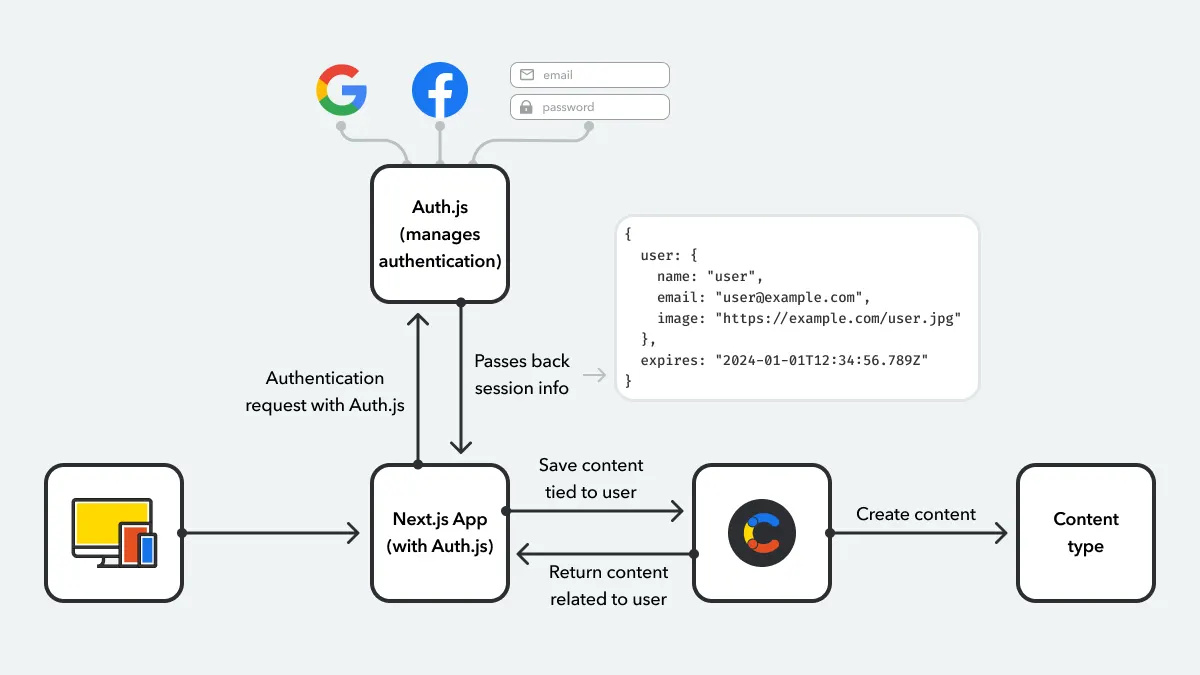
For most projects requiring comprehensive authentication (OAuth, email/password, etc.), I do not build the entire session layer from scratch. I leverage Auth.js, the official authentication library for Next.js.
What it handles for me:
- Multiple Providers: Google, GitHub, Credentials (email/password), etc.
- Full Session Lifecycle: Login, persistence, refresh, logout.
- Database Adapters: Seamlessly works with Prisma, Drizzle, Mongoose, etc.
- Security Best Practices: Built-in CSRF and XSS protection, secure cookie defaults.
When I use Auth.js, it abstracts the cookie and session management into a well-audited configuration. I define my providers and a secret, and it manages the rest, exposing a simple useSession() hook for the client and auth() function for the server.
// app/api/auth/[...nextauth]/route.js
import NextAuth from "next-auth";
import GoogleProvider from "next-auth/providers/google";

const handler = NextAuth({
  providers: [
    GoogleProvider({
      /* ... */
    }),
  ],
  secret: process.env.NEXTAUTH_SECRET,
  // I can still customize the session strategy (JWT or database)
});

export { handler as GET, handler as POST };
Critical Security Considerations I Always Enforce
httpOnly: Always True for Session Cookies. This is non-negotiable. It prevents client-side JavaScript from stealing the cookie via XSS.secure: True in Production. Ensures cookies are only transmitted over HTTPS.sameSite:laxorstrict. I typically uselaxfor a good balance of UX and CSRF protection.strictis more secure but can break normal navigation.- Strong Secrets: Any signing/encryption secret (for
@hapi/iron,NEXTAUTH_SECRET, etc.) must be a long, random string stored inenvvariables. - Session Expiry: I always set a reasonable
maxAge(e.g., 24 hours) and implement a refresh strategy, either by sliding the expiry on each request or using a separate refresh token. - Database Sessions for Sensitive Data: For applications handling financial, health, or other critical data, I always use the database-backed session pattern.
Advanced Patterns: Middleware Optimization and the App Router
With the App Router, I architect my session logic to be efficient and colocated.
- Session Access in Layouts: I often fetch the session in a root layout or a specific nested layout. This allows me to pass the user object down as a prop or context to all child pages, preventing each page from needing to make its own session lookup.
- Middleware for Global Protection: My middleware acts as the first line of defense, protecting entire route segments (like
/dashboard/**) before any component renders. It should be lean—checking for a cookie and validating a session ID in a fast store like Redis is ideal. - Server Actions for Mutations: Any action that changes state (posting a comment, updating a profile) is a Server Action. This action can directly access the secure
cookies()API to read the session and authorize the user.
Best Practices for Handling Cookies and Sessions
Handling cookies and sessions in Next.js requires adherence to best practices to ensure security, performance, and maintainability. Here are some key considerations:
Security First: Always use Secure and HttpOnly flags for cookies to protect them from cross-site scripting (XSS) attacks. Additionally, consider encrypting session data to prevent unauthorized access.
Minimal Data Storage: Store only essential information in cookies and sessions to minimize data exposure. Avoid storing sensitive information like passwords directly.
Session Expiration: Implement session expiration to automatically log users out after a period of inactivity. This helps protect user accounts from unauthorized access.
Use Established Libraries: Leverage libraries like js-cookie and next-session to simplify cookie and session management. These libraries are well-tested and provide robust APIs.
Regular Audits: Conduct regular security audits to identify potential vulnerabilities in your cookie and session handling mechanisms.
Following these best practices, you can ensure that your Next.js applications remain secure and efficient while providing an excellent user experience.
Common Challenges with Cookies and Sessions in Next.js
While Next.js offers powerful capabilities, developers may encounter challenges when handling cookies and sessions. One common issue is managing state across server-side and client-side operations. Since Next.js supports both server-rendered and client-rendered pages, maintaining consistent state can be complex.
Another challenge is dealing with third-party cookies, especially in environments where browser privacy settings are stricter. Developers need to ensure that cookies are set correctly and comply with privacy regulations like GDPR and CCPA.
Troubleshooting Tips
Cross-Domain Issues: When working with APIs on different domains, ensure that cookies are set with the appropriate SameSite attribute to prevent cross-site request forgery (CSRF) attacks.
State Synchronization: Consider using state management libraries like Redux or Zustand to synchronize state across client-side and server-side components.
Debugging: Use browser developer tools to inspect cookies and session data, making it easier to identify and resolve issues.
Addressing these challenges, you can create resilient Next.js applications that effectively manage cookies and sessions.
Tools and Libraries for Cookie and Session Management
Several tools and libraries can enhance cookie and session management in Next.js applications. These resources simplify implementation and provide robust features for handling stateful data.
Recommended Libraries
js-cookie: A lightweight JavaScript library that simplifies cookie management on the client-side. It provides an easy-to-use API for setting, getting, and deleting cookies.
next-session: A session management library designed specifically for Next.js. It offers middleware for handling sessions in serverless environments.
express-session: Although primarily used with Express.js, this library can be integrated into Next.js applications for server-side session management.
Useful Tools
Browser Developer Tools: Utilize built-in browser tools to inspect cookies and session data. This helps in debugging and verifying that cookies are set correctly.
Postman: A popular API testing tool that can be used to simulate requests and inspect cookie headers, aiding in debugging and testing.
Leveraging these tools and libraries, developers can streamline cookie and session management in their Next.js applications.
Case Studies: Real-World Applications of Next.js Cookies and Sessions
To illustrate the practical application of cookies and sessions in Next.js, let's explore a few real-world case studies. These examples demonstrate how different organizations have successfully implemented these concepts to enhance user experiences.
E-commerce Platform
An e-commerce platform used cookies to store user preferences and session data to track shopping cart contents across sessions. By implementing secure cookies and encrypted sessions, the platform ensured that user data remained protected while providing a seamless shopping experience.
Social Media Application
A social media application utilized sessions to manage user authentication and personalized content delivery. By integrating next-session, the development team was able to efficiently handle user sessions, allowing users to remain logged in across multiple page visits.
SaaS Dashboard
A SaaS company implemented cookies to store user settings and preferences, enabling a customized dashboard experience. By using js-cookie, the application was able to persist user preferences even after the browser was closed, enhancing user satisfaction.
These case studies highlight the versatility of cookies and sessions in Next.js, demonstrating their ability to support diverse application requirements.
Conclusion
In conclusion, mastering cookies and sessions in Next.js is essential for creating dynamic and user-centric web applications. By understanding the fundamental principles of cookie and session management, developers can enhance the functionality and security of their applications.
Throughout this guide, we've explored the intricacies of cookies and sessions in Next.js, from setup to implementation and best practices. By leveraging established libraries and tools, you can streamline the management of stateful data and deliver exceptional user experiences.
As you continue your journey with Next.js, I encourage you to experiment with different approaches to cookie and session handling. By doing so, you'll be well-equipped to tackle the challenges of modern web development and build applications that truly stand out.
If you're ready to implement these concepts in your Next.js projects, why not start today? Dive into your codebase and apply what you've learned. Your users will thank you for the seamless and secure experiences you create.
FAQs about Cookies and Sessions in Next.js
I strongly advise against using localStorage for session management in any Next.js application. localStorage is purely a client-side API. This creates a critical problem: your Server Components, Server Actions, and API routes cannot access localStorage at all. It is also inherently vulnerable to XSS attacks, where malicious scripts can steal the stored token. I use cookies with the httpOnly flag for sessions because they are automatically sent with every HTTP request, making them accessible to both the client and the secure server environment. For non-sensitive UI state (like a theme preference), localStorage is acceptable, but never for authentication.
For traditional Next.js applications (full-stack with SSR/SSG), I default to using cookies. They are handled automatically by the browser, provide built-in security attributes like httpOnly, secure, and sameSite, and integrate seamlessly with Next.js's server-side APIs like cookies() and Middleware. I reserve the Authorization: Bearer token header for pure API-centric architectures (e.g., a separate BFF or when my Next.js frontend consumes an external API). Using headers would require me to manually attach the token to every client-side fetch call, adding complexity and missing out on Next.js's integrated cookie security features.
When deploying to Vercel or similar platforms, I architect for statelessness. My go-to pattern is the database-backed session. I store a minimal session ID in the cookie, while the full session data resides in a globally distributed, fast data store like Vercel KV (Redis), Supabase, or DynamoDB. This is crucial because Serverless functions are ephemeral. I cannot rely on in-memory stores. For the Edge Runtime, I ensure all my session logic (including libraries like iron-session or next-auth) is compatible. The cookies() API works seamlessly in both environments, but I always verify my chosen encryption/signing libraries support Edge.
Both control cookie lifespan, but I prefer maxAge for its simplicity and clarity. maxAge sets the lifetime in seconds from the moment the browser receives the cookie. It's a relative time. expires sets an absolute expiration date (a Date object). The key practical difference is browser support and behavior. maxAge is defined in a newer standard but is now universally supported. Using maxAge (e.g., maxAge: 60 * 60 * 24) makes my intent clearer—I want this cookie to live for 24 hours. I consistently use maxAge in my Next.js applications for this reason.
No, and that's a primary benefit. When I use Auth.js, it becomes the custodian of my session strategy. It automatically generates, sets, validates, and rotates secure cookies based on my configuration (JWT or database session). My job shifts from manual management to configuration. I must securely set the NEXTAUTH_SECRET environment variable and choose appropriate session options (like strategy: "jwt" or strategy: "database"). I then use its provided methods (auth(), useSession()) to access the session user object. It abstracts the low-level cookie handling into a secure, well-audited black box, which I trust for most use cases.
Useful References for Next.js Cookies and Sessions
Official Next.js Documentation
-
cookies()API (App Router) – The core API for reading/writing cookies in Server Components, Server Actions, and Route Handlers. -
Middleware API – Documentation for using cookies within Middleware for authentication and routing logic.
-
Route Handlers – Shows how to access cookies from request/response objects in API routes.
Authentication & Session Libraries
-
Auth.js (NextAuth.js) – The official authentication library for Next.js, handling OAuth, email/password, and session management.
-
iron-session – A popular, lightweight library for stateless, encrypted sessions in Next.js.
Security Standards & Best Practices
-
OWASP Session Management Cheat Sheet – Foundational security principles for session handling.
-
MDN Web Docs: HTTP Cookies – In-depth explanation of cookie attributes (
HttpOnly,Secure,SameSite, etc.).
Data Storage (For Database-Backed Sessions)
-
Vercel KV (Redis) – Serverless Redis ideal for session storage in Next.js applications deployed on Vercel.
-
Upstash Redis – Another excellent serverless Redis option with a generous free tier.
Advanced Patterns & Articles
-
Next.js Authentication Patterns (App Router) – Vercel's official guide covering various auth strategies.
-
The State of Next.js Auth (Lee Robinson) – A talk and blog post from Vercel's VP of Product on modern auth patterns.
Utility & Cryptography
-
Web Crypto API – Native browser/Node.js API for generating secure tokens and performing encryption (useful for generating session IDs).
-
Node.js
cryptoModule – For generating secure random strings and session IDs on the server.